 Login
Login
Mobile Apps are now Live! Download Ten Pin Doctors on iOS or Android today!
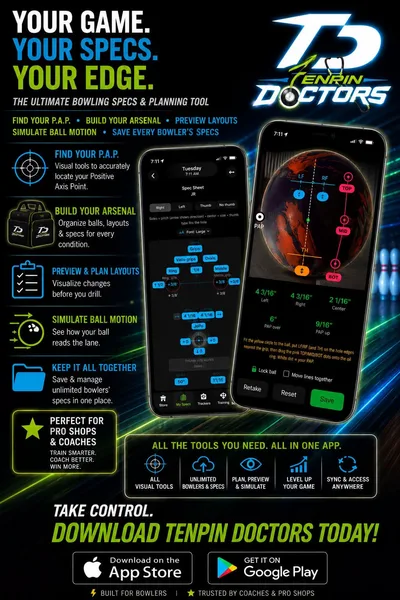
Have you ever wondered how a bowling ball would react before you purchased it? Or at least wish you had a general idea of how it would match up for you without emptying your wallet? Many bowlers and pro shop operators are blindly drilling bowling balls without knowing the realistic ball motion it would present for the bowler. Worse yet, it can be tedious and somewhat time-consuming to measure PAP and calculate ball layouts, especially without resources to give analytics and recommend specs under different lane conditions.
Luckily, Ten Pin Doctors has presented a solution for pro shop operators and common bowlers alike...straight from your mobile device! You can now download the iOS mobile app or Android mobile app. We will be providing updates in the future to both apps, whether it be implementing your requests for new features, improving existing features, or fixing reported bugs.
Steps for Setup
First, download and install the mobile app. Next, you will be prompted to log in to your Ten Pin Doctors user account from the Home tab. You can sign up for an account on that same home screen, or navigate to the registration page on the website. From there, if you navigate to the My Specs tab, you will see a screen that prompts you to subscribe to PinPoint Pro. The subscription is not required, but recommended if you'd really like to elevate your bowling game. You can file a card for either $3.99/month or $19.99/year to get access to all resources. These are only introductory prices, as the cost will jump to $6.99/month and $69.99/year after 30 days for both the iOS app and Android app. The deadlines to settle in for the cheaper introductory price is October 21st for Apple users and October 29th for Google Play users.
Resources included in the subscription include the My Specs tab, which has the ability to measure PAP and calculate ball layouts from images you can take from your smartphone or tablet, as well as simulate ball motion. Upon subscribing, you will also be given access to connect and interact with PinPoint devices - that being the PinPoint Tracker, PinPoint DUO, and upcoming PinPoint Coaching device - if you have bought any from our online store. That is under the PinPoint tab. Directly linked with usage of the PinPoint devices is our training program under the Training tab, where you can complete training routines and challenges for each daily session you do.
The First Feature Explained: the "My Specs" Tab
Again, in order to have any access to the My Specs tab, you must have a subscription. This feature is reserved for tracking bowling balls, mostly in the realms of measuring ball specifications, for both bowlers and pro shop operators. These ball "specifications" are for measuring PAPs and calculating ball layouts from any images you take of bowling balls on your mobile device. This can be for yourself, a fellow bowler, or for a bowler you'd like to drill a new ball for; different people can be organized into folders. You can associate a PAP measurement and layout for each bowling ball of each bowler; the data syncs on every save. Each bowling ball can also be added to different arsenals you name and have its motion simulated on a lane. Seeing a projected path for each bowling ball on different lane conditions beats the inevitable guess, or perhaps "hit-or-miss", of buying a new ball you've never thrown...doesn't it?
The "Find New PAP" button will lead you to a screen where you can upload a photo of a bowling ball or capture an image of one with your device. Lock the circle onto the ball so it matches size and position, then move the dots to the 3 marked places (you can do that with a wax pencil) of "Top", "Mid", and "Bot" for where the nearest oil flare ring is on the ball. Next, move the markers next to the two finger holes, and if you use your thumb in your release, next to the thumbhole...and voila! Your PAP is calculated.
Calculating a ball layout follows the same general concept in that it is done by analyzing a bowling ball image with markers set in the proper positions. This time, it is done by setting the positions of the ball's pin, CG, and if an asymmetrical ball, the mass bias ("MS"). We give the leeway of calculating layouts using dual angle layouts and Storm's systems of VLS and 2LS! You also have the luxury of rounding numbers up to the nearest 5 degrees and quarter inch, or to get the measurements exact.
You can also simulate shots with different variables set for each bowling ball, with multiple shots allowed per ball, by clicking the "Simulate Ball Motion" button. This screen is also reachable from the "Plan a Layout" screen, where you can categorize bowling balls you'd wish to drill, but haven't yet, into a folder. The "Simulate Ball Motion" screen is essentially a 3D bowling lane with animated shots of a bowling ball traveling down the lane and knocking down pins, based on an algorithm that projects how the bowling ball will react on different conditions.
Variables you can set on the ball motion simulator include, but are not limited to: rev rate, ball speed, axis rotation, axis tilt, targeting through the laydown board and board at the arrows, and the selected bowling ball's core, coverstock, layout, and surface. These variables can be set for each bowler, so it is the same every time, by clicking the "Global Settings" button under the My Specs tab. You can even customize the lane conditions by changing lane surface - like with wood or synthetic - and selecting different oil patterns, whether a typical house shot, PBA sport pattern, or Kegel pattern! Upon selection of an oil pattern, the length, volume, and ratio of the oil pattern will automatically adjust, and ball reaction will fluctuate more the more difficult the condition is.
Each bowling ball can be associated with one we currently track in a database. So, you can know the core, coverstock, RG, differential, and factory finish of your bowling ball, and much more, by just matching your ball to any of the 2,700+ balls we support in our database. These bowling balls can be currently on the market, about to be released, or even retired; our list goes all the way back to 1957. You can also save PAPs, layouts, planned layouts, and simulated shots into folders for each bowler, where you can edit or delete them anytime later.
Other Resources
As mentioned earlier, integration with PinPoint devices - whether the PinPoint Tracker, PinPoint DUO, or upcoming PinPoint Coaching device - is supported, under the PinPoint tab. You can connect and calibrate to these devices just like you do from the webpages on www.tenpindoctors.com. For instructions on proper setup and usage of these devices, please visit the Store page, locate whichever type of PinPoint device you own, and click on the question mark icon for help. We also offer specialized training and challenges that work in tandem with usage of PinPoint devices in the Training tab.
You can also search all bowling balls ever made or to be made in the Knowledge tab, in addition to oil patterns, bowling centers, pro shops, and bowling dictionary terms, just like in the website's Knowledge Base. Browse products that both Ten Pin Doctors and BowlerX sells in the Store tab, and watch all of JR Raymond's videos on his YouTube channel under the Videos tab.
Conclusion
Download and install the Ten Pin Doctors mobile app today! We appreciate your continued contributions and support to our brand, and please stay tuned for future updates to this app that may just revolutionize the sport of bowling!
You must sign up or log in to add comments to this blog article.